
A reader sent us an email wanting to know how to stop pop-up messages in QuickBooks. Well, while it is not possible to step every pop-up message sent from Intuit in QuickBooks, you can stop many of them.
First, you need to turn off pop-up advertising messages—a preference setting in QuickBooks Desktop versions. Because the preference I am discussing is a personal (My) preference, you do not need to be the Company Administrator to perform this task.
- From the QuickBooks Menu, select Edit and choose Preferences
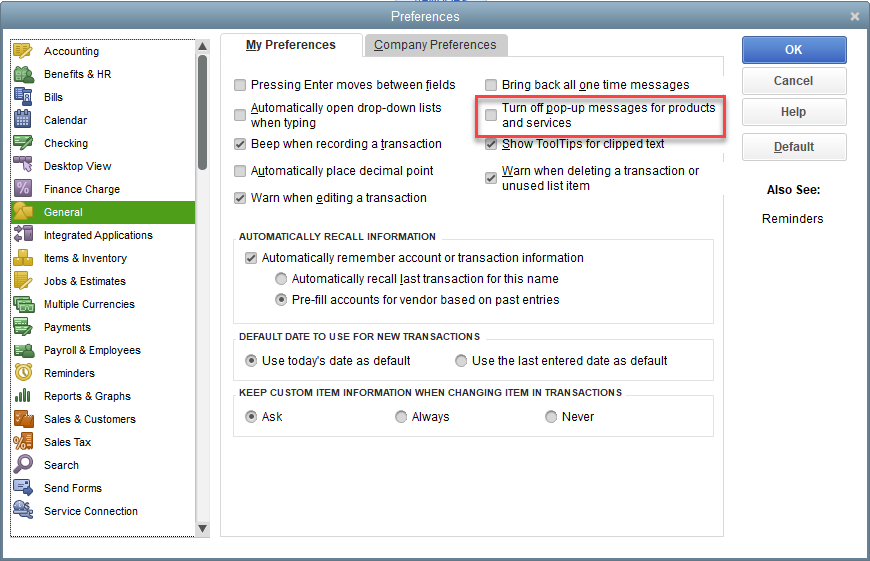
- Select General Preferences, then My Preferences
- You must place a check-mark in the Turn off pop-up messages for products and services preference to help prevent many of the messages you are getting
- Make certain to Save your preference change
Second, if you are the Company Administrator, you also can make another preference change to a Company Preference, but this must be done in Single-user Mode.
- From the QuickBooks Menu, select Edit and choose Preferences
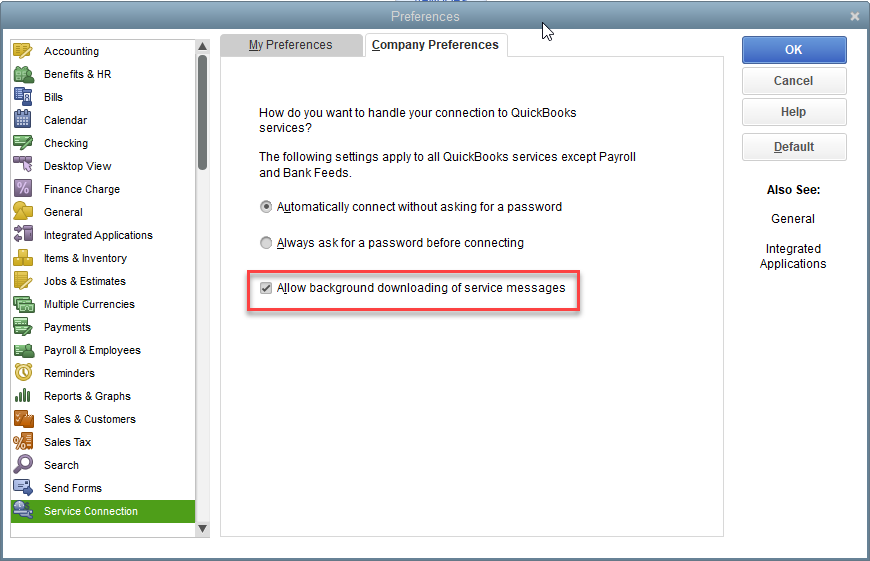
- Select Service Connection, then Company Preferences (remember you must be logged in as Company Admin in Single-user Mode to do this)
- Uncheck the preference Allow background downloading of service messages
- Make certain to Save your preference change
By making these two preference changes, you can substantially reduce the number of pop-up messages you receive within QuickBooks Desktop. Intuit still canl push-out some messages, especially if you are using a QuickBooks Payroll Service, and there is no preference to turn-off those messages.