
The number of QuickBooks Self-Employed users is growing quickly. And like other QuickBooks users, they have learned they can ask for stuff. Apparently, one of the things these users wanted was the ability to add a logo to their QBSE Invoices.
Intuit recognized the importance of the use of a logo to help QuickBooks Self-Employed users stand-out. Adding a logo helps QBSE users get recognized by clients.
As a side effect, statistics show that people are more apt to make payments faster when they can easily identify who an invoice is coming from.
It's easy to add a logo, but there are some things you should consider when getting ready to make this change. First, for the best image quality in QuickBooks Self-Employed, insure that the logo is no larger than 10MB in file size. You can upload JPG, PNG, GIF or PDF file types to QuickBooks Self-Employed. Intuit recommends that your logo should be sized 184x80 pixels.
You also should keep the background of your logo white. Don't apply any framing to the logo. This way, it will lay flat on your QBSE invoices.
To add a logo in QuickBooks Self-Employed:
- Login to your QuickBooks Self-Employed account
- Create an Invoice
- Select Edit Work Info
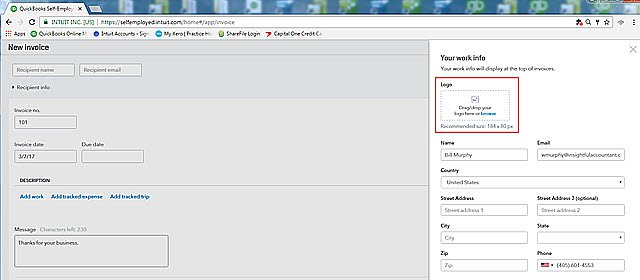
- Under Your Work info, Drag/Drop your logo from your computer or mobile device into the Logo field (shown in the red box in the illustration above)
- As an alternative, click the browse link within the Logo field, to allow you to surf to your logo location
- Be sure to Save Your Work info after you have uploaded your Logo
It's just that simple, now you can have classy looking Invoices featuring your Self-Employed Business Logo.