
October has arrived; can you believe it? And with its arrival, Intuit has launched the new ProAdvisor 'Workforce' certification in lieu of 'Payroll' certification within the QuickBooks Academy.
Insightful Accountant told you about the timing of the new certification's arrival a week ago, and right on time, the ProAdvisor 'Payroll' certification has been replaced by the new 'Workforce' certification. But for all you 'Payroll certified' ProAdvisors out there, you will be happy to know that the Intuit ProAdvisor Academy banner reports, "Already Payroll Certified? You're automatically Workforce certified." How about that for an early handout of Halloween Candy?

The QuickBooks Workforce Certification prepares you to confidently deliver payroll services to your clients by contextualizing payroll fundamentals - from workers and wages to deductions and compliance - as you walk through the ins-and-outs of setting up and running payroll using Intuit QuickBooks Workforce.
Now the new "QuickBooks Workforce Certification" is made up of four (4) training courses: Introducing QuickBooks Workforce, Understanding payroll, Setting up payroll, and Running payroll and filing taxes. Collectively these four courses comprise approximately five (5) hours of self-paced training, and will earn you up to four-and-one-half (4.5) CPE credits.

Reportedly, there is 'No prerequisite(s)' for the training; however, "I personally can't understand how anyone who hasn't achieved at least QuickBooks Level 1 training could understand the relationship between QuickBooks and Workforce." (Murph)
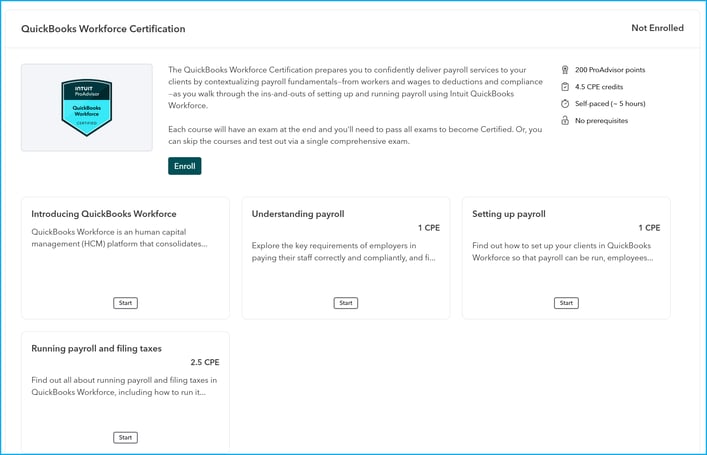
Each of the courses includes an examination at the end of the self-paced training. Participants will need to pass the exam for each of the courses in order to become 'Certified.' But there is a 'opt-out' of the training option in which you can take a single comprehensive exam, and if you pass that then you are 'Certified.'
Now, let's examine each of the training segments individually.
Introducing QuickBooks Workforce
QuickBooks workforce is a human capital management (HCM) platform that consolidates payroll, time tracking, benefits administration and managing the employee lifecycle into a single environment. This course will walk you through the key features of the platform, how it supports different types of clients, and what you can expect from the certification. By completing this first course you should be able to:
- Understand how QuickBooks Workforce supports growing businesses,
- Outline the main screens that sit within the Payroll, Team and Time apps,
- Identify which QuickBooks Workforce plan is most suitable for any given client,
- Explain the advantages of integrating Payroll, HCM, and accounting activity, and
- Describe the QuickBooks Workforce Employee app and how it simplifies payroll.
Understanding Payroll
Explore the key requirements of employers in paying their staff correctly and compliantly, and find out about the different processes, laws, and considerations that anyone working with payroll needs to be aware of. By completing this course, you should be able to:
- Describe the main regulations and agencies governing U.S. employment tax,
- Outline payroll tax requirements,
- List the most common tax reports an employer may be required to file and when,
- Outline the payroll cycle and the employer's responsibilities at each state,
- Distinguish between contractors and employees, and exempt and nonexempt employees,
- Describe how employees' paychecks are calculated, including the impact of pay schedules overtime pay, and deductions.
Setting-up Payroll
Find out how to set up you clients in QuickBooks Workforce so that payroll can be run, employees paid accurately, and the correct deductions and contributions are withheld. Explore the employee profile and learn how employee self-boarding can save you and your clients time. By completing this course, you should be able to:
- List the user roles with payroll permissions in QuickBooks,
- Set up company and tax information in QuickBooks Workforce,
- Map payroll expenses to the chart of accounts and classes (in QuickBooks),
- Set up QuickBooks Time,
- Add and edit payroll items and other payroll settings,
- Add employees to QuickBooks Workforce and update employee details, and
- Offboard employees.
Running Payroll and Filing Taxes
Find out all about running payroll and filing taxes in QuickBooks Workforce, including how to run it manually, how to set up Auto Payroll, and Payroll AI, and how QuickBooks manages paying and filing taxes. Discover how to resolve any issues that might arise as you run payroll and explore how payroll data flows through QuickBooks to provide your clients with useful information about their businesses. By completing this course, you should be able to:
- Run payroll manually using QuickBooks Workforce,
- Run an unscheduled payroll,
- Use Auto Payroll to run payroll,
- Use Payroll AI to run payroll,
- Correct issues with payroll,
- Describe how QuickBooks manages paying and filing taxes,
- Explain how employees can access their W-2s through QuickBooks, and
- Describe how payroll data flows into QuickBooks.
So, there you have it, a brand-new certification. How long before you 'dive into' QuickBooks Workforce Certification?
Let us hear what you think about this new certification... "Are you excited about the new certification ".... "Do you plan to take it right away".... "Do you plan to holdout to see if you will have to recertify in Payroll by testing for Workforce somewhere down the road"? Post you responses, comments and questions in the comment section below.
Disclosures:
Feature content adapted from Intuit sources including the Intuit ProAdvisor Academy accessible via Intuit Accountant Suite, and other Intuit content. Insightful Accountant is not responsible for any original Intuit content.
Intuit® Inc., is a publicly traded corporation headquartered in Mountain View, California. Intuit is the global financial technology platform that powers prosperity for the people and communities we serve. With approximately 100 million customers worldwide using products such as TurboTax, Credit Karma, QuickBooks, and Mailchimp, we believe that everyone should have the opportunity to prosper. We never stop working to find new, innovative ways to make that possible. Please visit us at Intuit.com and find us on social for the latest information about Intuit and our products and services.
This is an editorial feature, not sponsored content. No vendor associated with this article has paid Insightful Accountant or the author any remuneration to be included in this feature. The article is provided solely for informational and educational purposes.
Note: Registered Trademark ® and other registration symbols (such as those used for copyrighted materials) have been eliminated from the articles within this publication for brevity due to the frequency or abundance with which they would otherwise appear or be repeated. We attempt to credit such trademarks or copyrights within our respective article footnotes and disclosures.