
Payroll Tax AI is an AI-assisted feature set in QuickBooks Payroll designed to help users monitor, understand, and resolve payroll tax issues with less manual research.
When using QuickBooks Payroll, QuickBooks automatically withdraws payroll taxes from your designed bank account when you process payroll, a past payroll is adjusted, a tax rate is updated, or any time there is an increase in taxes owed. It then makes those tax payments at the appropriate time.
Once Payroll Tax AI is activated using the Intuit Intelligence icon, it begins to reference tax agency resources to surface any relevant compliance information and flag potential payroll tax risks. It will also notify users if it detects payroll and payroll tax setup problems as well as issues impacting tax payments.
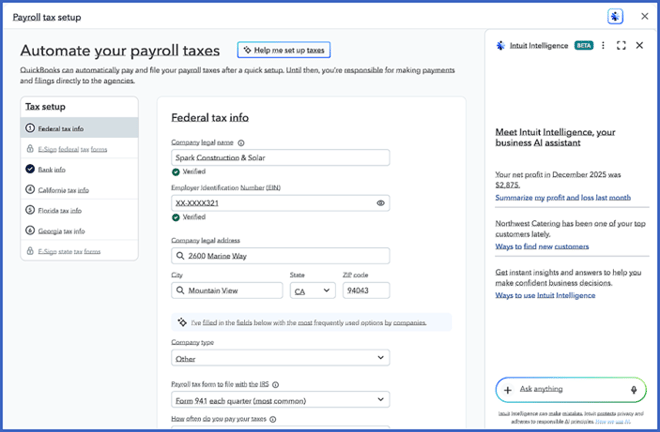
One of the most useful roles of Payroll Tax AI is supporting bookkeeping and tax-readiness workflows. It can explain where payroll tax-related numbers come from, such as payroll runs, liabilities, and prior payments, so users do not have to search several screens to reconstruct a tax item’s history. Because users can ask targeted questions in natural language, the feature can reduce time spent looking for context and make it easier to identify whether an item is urgent, informational, or part of a broader client workflow.
Payroll Tax AI is designed to provide expert level, contextual, and personalized guidance through natural language conversational experience, explaining complex topics like payroll tax setup, payment computations, and rejected payroll tax flings. Instead of making users piece together information from several payroll tax screens, it translates filing statuses, payment activity, setup requirements, discrepancies, and agency notices into plain-English explanations. The goal is to make payroll tax work easier to understand and act on, especially when something does not go as expected.
Payroll Tax AI helps users answer four practical questions: whether payroll tax setup is complete, what happened when a filing or payment did not process correctly, what should happen next, and what remains filed, paid, scheduled, or owed. These are the areas where payroll tax problems often become time-consuming, because the underlying issue may involve agency IDs, account numbers, rates, e-file authorization, bank debits, filing status, or missing setup information.
Payroll Tax AI is also helpful when QuickBooks did not pay payroll taxes automatically. In those situations, the issue may involve AutoPay or AutoTax gaps, missing authorization(s), a bank debit return, insufficient funds, or an incorrect bank account. Rather than simply showing that a tax amount is due or past due, the AI can explain what the item relates to, whether a payment was made, why a filing might have been rejected, and how federal, state, and local payroll tax activity fits together.
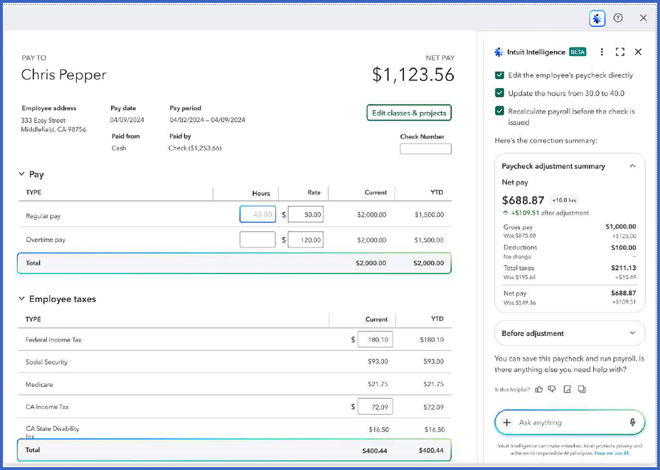
Payroll Tax AI can also explain the status of payroll tax filings and payments. A filing may be submitted but not yet accepted, a payment may be scheduled but not yet debited, or an item may require a re-debit after a failed payment attempt. Payroll Tax AI puts those details into context by clarifying what has happened, what is still pending, and what action may be needed to keep the business on track with filing and payment deadlines. It can also help users interpret agency notices by summarizing what the notice asks for and identifying the information usually needed to respond.
When there is a filing error, Payroll Tax AI helps narrow the problem before guiding the user toward a fix. Filing problems often fall into predictable categories. In some cases, QuickBooks cannot file because setup is incomplete, such as missing agency account information, state registration details, e-sign authorization, or payroll tax setup requirements. In other cases, the issue is tied to payroll data integrity, such as voided or reissued checks, closed periods, missing tax tracking, or payroll items that are out of balance. A third possibility is that the filing is ready, but a related tax payment has failed or is still pending because of a bank or debit issue.
After the issue is identified, the AI can help isolate the root cause by showing which form or jurisdiction is affected, whether the submission was not sent, sent, rejected, or accepted, and what rejection details or agency messages are connected to the problem. This matters because the right fix depends on the type of failure. A setup issue may require completing payroll tax setup before filing. A rejection may require correcting agency-facing IDs or registration details and resubmitting. A payment failure may require resolving the bank debit issue before retrying the tax action. A data problem may require correcting payroll records before the filing can be regenerated.
Payroll Tax AI works best as a guided explanation and troubleshooting layer for payroll tax work. It does not replace the need to verify agency requirements or maintain accurate payroll setup, but it can make the process clearer by connecting the status, cause, and next step in one place. For users managing payroll tax obligations across multiple clients or jurisdictions, that clarity can make it easier to prioritize urgent issues, resolve blockers, and stay on track with filings and payments.
Overall, Payroll Tax AI is intended to do more of the work surrounding Payroll taxes for you, in other words, making the process of managing payroll taxes a "done for you" experience.
Disclaimers:
Some content (including feature graphics) have been adapted from Intuit media source materials from Intuit QuickBooks 'in-product help' documentation. Insightful Accountant publishes such adapted content for educational and informational purposes only.
QuickBooks, QuickBooks Online (QBO) and QuickBooks Online Payroll (aka: QuickBooks Workforce) are registered trademarks of Intuit, a corporation based in Mountain View, CA.
Any other trade names or entities mentioned within this article that refer to products registered, trademarked, or otherwise held by their respective owners are hereby acknowledged as such. Such references are solely for informational and educational purposes.
This feature is "not" sponsored content. The article is provided for informational and educational purposes. The publication of this article does not represent an endorsement by either the editors or publishers of Insightful Accountant.
Note: Registered Trademark ® symbols have been eliminated from the articles within this publication for brevity due to their frequent occurrence. We attempt to credit such trademarked products within our respective article footnotes and disclosures.