
In this mini-series we have been looking at not only some of the core inventory management functionalities but exploring how Intuit is reportedly upgrading QuickBooks Online to incorporate these functionalities, heretofore lacking within QBO.
On January 8, 2026, Intuit’s Firm of the Future blog published, “QuickBooks Online new features and updates – January 2026’. In that article ‘New inventory features’ were announced as being ‘now available’ for QBO Plus, QBO Advanced and Intuit Enterprise Suite (as well as other SKUs with the ‘inventory’ add-on). We've gone in-depth over three of the four inventory features listed in that article; however, one feature ‘Item receipts’ has yet to be covered in this mini-series.
If you are anticipating us to cover that feature, we must disappoint you because we have been unable to identify where that specific new feature exists, how to access it for activation, and even to find anything substantial listed in ‘in-product’ Help that confirms such a feature exists. In fact, when you go to in-product Help Intuit Intelligence tells you, “In QuickBooks Online, there is no direct ‘Item Receipt’ feature like in QuickBooks Desktop.” It then proceeds to tell you to create a Bill or Expense or convert your Purchase Order for the item(s) into a Bill.
Of course, that is contrary to the Firm of the Future Blog article that advises the new feature provides, "Support for item receipts helps your clients create a documented record of received goods, ensuring accurate quantity tracking, alignment with purchase orders, and reduced processing times.”
I would like to tell you that we tracked down the feature and know that it is rolling into your eligible QBO by not later than a specific date, but we really haven’t been able to clarify if and when this feature might come to fruition.
Nevertheless, we are going to discuss the purpose and intent of have an ‘inventory receiving’ functionality that acts separate and apart from recording a Vendor’s Bill.
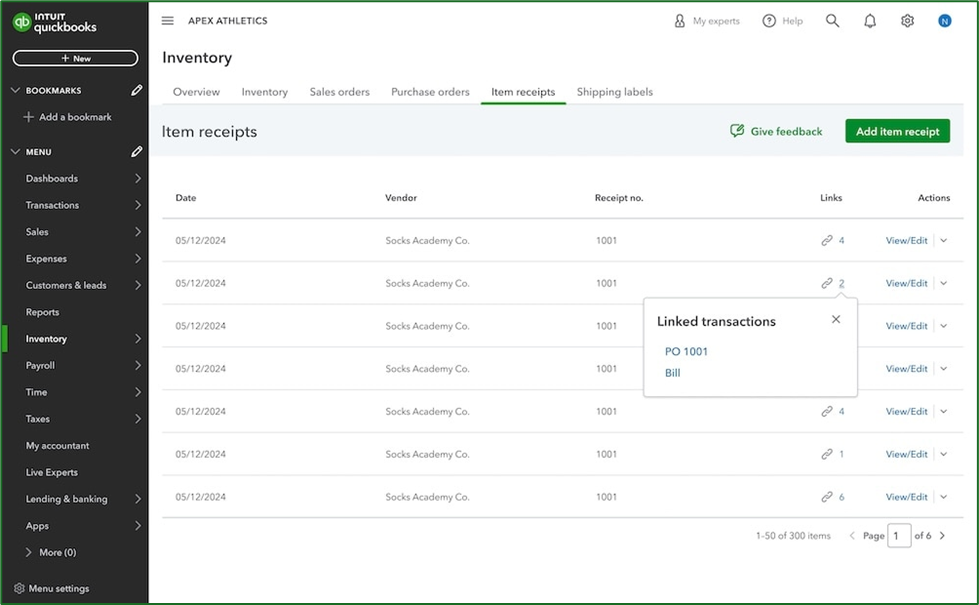
Image Source: Intuit media source content, Item receipt depiction appearing in the January 18, 2026, Firm of the Future Blog article cited in this section.
Receiving Inventory
One of the critical functions of inventory management is the ability to ‘receive’ inventory prior to the time the supplier (vendor) actually invoices you for the stock items they sent (or had sent to) you. When a supplier has third-party send products to you (drop ship them) they rely on their supplier to notify them that you received the stock items before they invoice them.
Until recently*, if you were using QuickBooks Online for inventory control you had to wait until you got the supplier’s invoice in order to post the stock items you had received into inventory, even if you had issued a Purchase Order for them. But now, QBO offers the ability to record an ‘Item Receipt’ allowing you to receive inventory without having received a Vendor Bill.
If you issued your supplier a Purchase Order for stock items, you can receive those items into your inventory and update the quantity on hand for each item you receive. For those of you familiar with Item Receipts in QuickBooks Desktop versions, the new Item Receipt feature in QBO apparently has been designed to work in essentially the same way.
When will Item Receipts Arrive in QBO?
I actually found one ‘live’ reference to item receipts within the QBO in-product Help. If you get very specific and as “Setting up item receipts for inventory” you get a response telling you how to activate the feature. The problem is that the steps reflected in that ‘help article’ don’t actually correspond to available settings options in versions of QBO that should have the feature.
Still the same ‘help article’ was updated at approximately the same time as the Firm of the Future Blog article, I am hopeful that ‘Item Receipts’ are just around the corner (which corner, I’m not sure, but some corner, and hopefully one that is close to our location.)
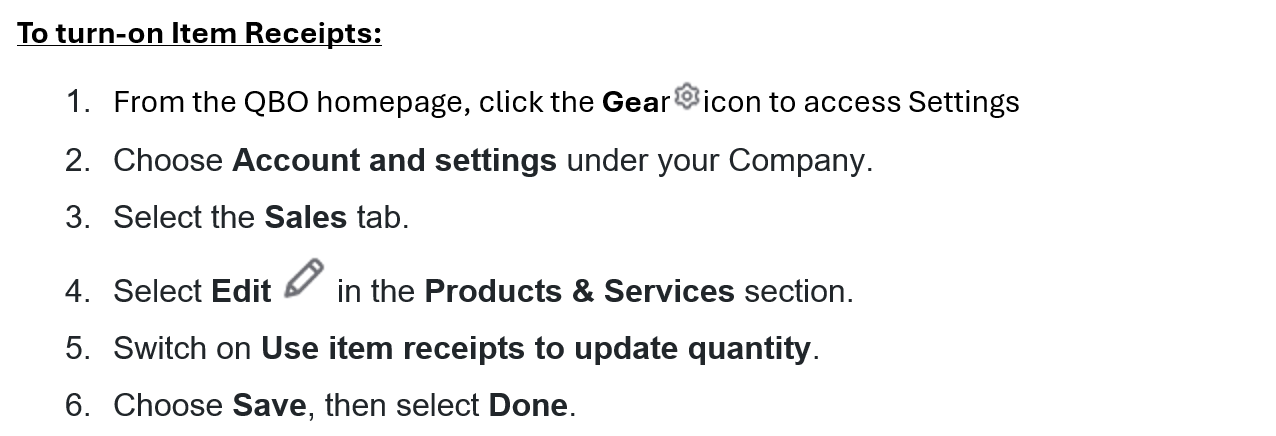
If and when the feature does ‘roll-into’ a QBO in your neighborhood*, the following is supposedly the steps for setting it up.
Setting Up QBO to use Item Receipts for Inventory
To use Item Receipts in QBO-Plus, QBO-Advanced and Intuit Enterprise Suite you must turn on the functionality. Be aware, once you turn on Item Receipts you cannot turn the feature off within that QBO Company file.
Insightful Accountant intends to keep a keen watch out forth is feature and will let you know more about the feature in a Part 4.02, its availability, and workflows associated with its use just as soon as the feature or such information is made available.
Footnotes:
*- this feature may have been prematurely announced, or itis rolling out on a cyclic basis. Not all QBO1 users may experience this feature simultaneously.
1- the term ‘QBO’ used here is intended to specifically mean: QuickBooks Online Plus, QuickBooks Online Advanced and Intuit Enterprise Suite. The feature will also be available to those ‘other QBOS KUs’ that incorporate an optional ‘inventory feature’ for QuickBooks.
Disclosures:
Some feature content was adapted Intuit media source content including In-product Help or other Customer Support web content. Some content including graphic images captured during actual product use. Features adapted by Insightful Accountant from Intuit source content are furnished for educational purposes only.
Intuit® Inc., is a publicly traded corporation headquartered in Mountain View, California. Intuit is the global financial technology platform that powers prosperity for the people and communities we serve. With approximately 100 million customers worldwide using products such as TurboTax, Credit Karma, QuickBooks, and Mailchimp, we believe that everyone should have the opportunity to prosper. We never stop working to find new, innovative ways to make that possible. Please visit us at Intuit.com and find us on social for the latest information about Intuit and our products and services.
Other trade names or references, if any, used within this feature refer to registered, trademarked, or copyrighted materials held by their respective owners and are included only for informational and educational purposes.
This is an editorial feature, not sponsored content. No vendor associated with this article has paid Insightful Accountant or the author any remuneration to be included in this feature. The article is provided solely for informational and educational purposes.
Note: Registered Trademark ® and other registration symbols (such as those used for copyrighted materials) have been eliminated from the articles within this publication for brevity due to the frequency or abundance with which they would otherwise appear or be repeated. We attempt to credit such trademarks or copyrights within our respective article footnotes and disclosures.