
When I used QuickBooks Desktop, one of the conveniences was the ability to pay multiple invoices to my vendors at the same time.
The Bill Payment window even let me view all the invoices from a single vendor and I could easily select the ones I wanted to pay, then process the payment by whatever method I chose. The vendor got a list of the invoices I was paying with my payment.
But with QuickBooks Online, neither I nor my customers have had the same option until recently. Now, when you are using QuickBooks Online with QuickBooks Payments, a business can select the invoices they want to pay and handle everything at once, without the need to pay each invoice separately.
- When a business using QBO with QBO-Payments sends an invoice to a customer by attaching it to an email, or a text for customers with QuickBooks Payments.
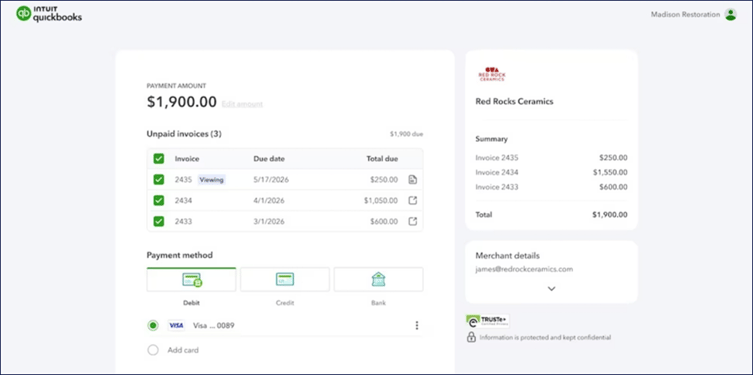
- The Customer will see not only this latest invoice, but all their unpaid invoices to your business, in the Checkout Portal.
- They can select any or all of the invoices they want to pay, and they can pay their invoices directly using a credit card, PayPal, Venmo, or ACH transfer.
When that customer pays through QBO-Payment, QuickBooks handles the entire process and posts not only receipt of the payment but reconciles the payment against the outstanding Accounts Receivable.
When the payment is reflected in the Bank Feed since it reconciles with both the bank account ledger and the accounts payable journal, everything matches up correct in all of your QBO accounts.
Disclosures:
Feature content (including graphic) adapted from Intuit media source content. Insightful Accountant is not responsible for any original Intuit content.
Intuit® Inc., is a publicly traded corporation headquartered in Mountain View, California. Intuit is the global financial technology platform that powers prosperity for the people and communities we serve. With approximately 100 million customers worldwide using products such as TurboTax, Credit Karma, QuickBooks, and Mailchimp, we believe that everyone should have the opportunity to prosper. We never stop working to find new, innovative ways to make that possible. Please visit us at Intuit.com and find us on social for the latest information about Intuit and our products and services.
Other trade names or references, if any, used within this feature refer to registered, trademarked, or copyrighted materials held by their respective owners and are included only for informational and educational purposes.
This is an editorial feature, not sponsored content. No vendor associated with this article has paid Insightful Accountant or the author any remuneration to be included in this feature. The article is provided solely for informational and educational purposes.
Note: Registered Trademark ® and other registration symbols (such as those used for copyrighted materials) have been eliminated from the articles within this publication for brevity due to the frequency or abundance with which such symbols would be displayed.