
We are doing something out of the ordinary in this edition of QuickBooks Monday Minute. We are going to take a moment to describe how you can opt into the new Books Close feature within the new Intuit Accountant Suite.
Last week, we provided you with fairly detailed instructions on how you can transition from QuickBooks Online Accountant to Intuit Accountant Suite. One reason we’ve chosen to do that was in anticipation of next week’s QBTalks show, which we’ve been telling you about and will cover the use of the new Books Close feature.
We want to allow you not only to decide whether you want to transition to the Intuit Accountant Suite, but also to opt in to the Beta version of Books Close, which is currently available to IAS users at no additional cost (during Beta). Our rationale is to let you perform the various setup, configuration, and use steps for Books Close while our special guest, Anusha Natarajan, the principal product manager who has been working on Books Close for Intuit, takes you through them.

We also want you to have the opportunity to familiarize yourself with the various menu items and features of Books Close before the start of that QBTalks.
To ensure you have these options available, we are taking this edition of QuickBooks Monday Minute to provide you with the steps to activate Books Close within Intuit Accountant Suite.
You must be logged in as the Primary Admin user for the Intuit Accountant Suite Realm to add Books Close to the product.
To activate Books Close, locate the Books Close icon in the left-hand navigation bar of Intuit Accountant Suite. Note that there is a ‘gem’ next to the icon. Alternatively, you might need to select the My apps icon in the left-hand navigation bar and then select Books Close.
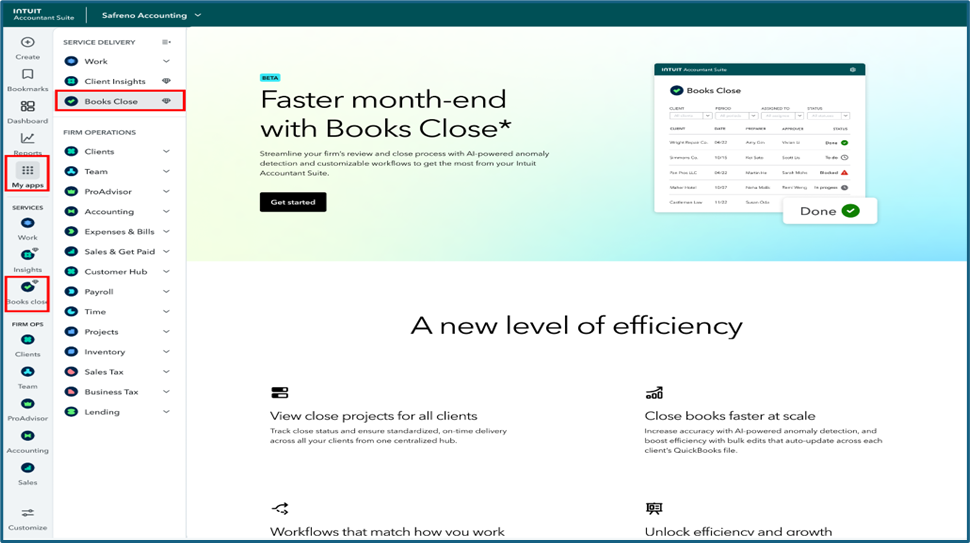
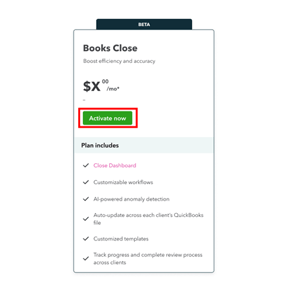
Select Get Started where it says Faster month-end with Books Close*. When the Books Close ‘Beta’ window opens, choose Activate Now. Currently, Books Close is ‘free’ while it is still in Beta; however, Books Close is a premium feature that will incur a cost after the Beta period ends. Users will, however, have the option to discontinue using Books Close should they not wish to pay for the premium feature once the fee(s) for the functionality are set.
Note that you can also choose to Activate Books Close from the Firm Subscriptions options under Subscriptions and billing within Intuit Accountant Suite.
To review (or clarify) these steps, you can watch this official Intuit YouTube video.
The QBTalks mentioned in this article is being held on December 17, 2025, at 2:00 PM (Eastern). If you are already registered for QBTalks, you will receive your Zoom notifications automatically with further event details. If you are NOT already registered:
If this feature seems short to you, remember, this is the 'Monday Minute'. The read is only supposed to take you a minute or less.
Disclosures:
Content (including graphic content) is based on or adapted from Intuit media source materials, including, but not limited to the Intuit Accountant Suite website and the actual Intuit Accountant Suite product including supporting help documentation. Intuit content adapted by Insightful Accountant from Intuit sources is furnished for educational purposes only.
The steps outlined in this feature are intended to provide the reader with 'general' guidance for opting into the Books Close optional feature of Intuit Accountant Suite. For more information, consult instructional (help) information from the Intuit Accountant Suite websites or contact QuickBooks support.
As used herein, QuickBooks®, QuickBooks Online Accountant and Intuit Accountant Suite refer to one or more registered trademarks of Intuit® Inc., a publicly-traded corporation headquartered in Mountain View, California.
Any other trade names or references used herein may refer to registered, trademarked, or copyrighted materials held by their respective owners; they are included in the content for informational and educational purposes only.
This is an editorial feature, not sponsored content. No vendor associated with this article has paid Insightful Accountant or the author any form of remuneration to be included within this feature. The article is provided solely for informational and educational purposes.
Note: Registered Trademark ® and other registration symbols (such as those used for copyrighted materials) have been eliminated from the articles within this publication for brevity due to the frequency or abundance with which they would otherwise appear or be repeated. Every attempt is made to credit such trademarks or copyrights within our respective article footnotes and disclosures.