
Though still in 'Beta', Intuit's newest agentic-AI powered agent is Business Tax AI designed to assist users with tax compliance and to track down tax deductions.
Intuit Intelligence is the gateway to agentic-AI powered experiences launched across Intuit’s business platform last year, including the Accounting Agent, Payments Agent, Customer Agent, Payroll Agent, and Sales Tax Agent, delivering faster, more confident decisions that generate real results.
One of the newest agentic-AI powered agents is the Business Tax Agent, still in beta. Intuit recognizes that ProAdvisor, Accountants, Bookkeepers and Tax Preparers want to lower the tax liabilities of their clients as much as possible, ensuring that SMBs keep more of what they earn through accurate tax returns.

In order to assist with this goal, Intuit has built the new Business Tax AI functionality to assist QuickBooks users with tax compliance through tracking down missing tax information and potential deductions which can result in the taxpayer given the IRS more of their hard-earned dollars.
But before we dive much deeper let's look at some accessibility issues regarding this new functionality. First, Business Tax AI is only available in the US (currently) and only available for QuickBooks Online (Essentials, Plus, and Advanced) plans (for now). Second, Only the Company Admin, Primary Admin, and Accountants linked to a company via QBO-Accountant can access Business Tax AI. Third, this new feature is geared (at present) to assist Sole Proprietor, S-Corporation, and Partnership tax form type QBO users.
For tax preparers, or clients who do their own taxes, the new QuickBooks Business Tax Agent (beta) works to simplify tax season in at least two ways initially.
- First, the new Agent acts as a Deduction Maximizer to find and suggest ways to maximize deductions automatically, helping clients stay compliant year-round. Business Tax AI suggests deduction categories based on several business factors including:
- Industry
- Employee count (# of personnel)
- Tax form (entity type as I mentioned above)
- Gaps the App identifies in your QuickBooks data
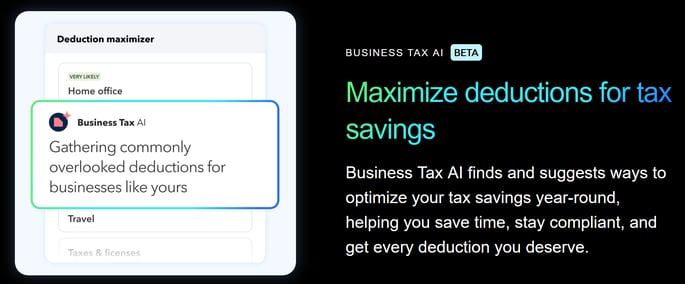
- Second, the new Agent also provides Proactive reminders throughout the year to help maintain compliance and maximize savings. For example, if there is an expense that was paid in cash or charged to a different account not linked to QuickBooks, this expense might be missed. Because the Business Tax Agent knows a client’s industry by virtue of leveraging LLMs, and the client’s type of business, and number of employees, it can potentially surface data the ProAdvisor might not have seen. It can then suggest missed deductions across relevant categories and also set reminders to fill in the missing information or add a new expense before any ‘close of the books’ or ‘tax return preparation.’
Accessing Business Tax-AI
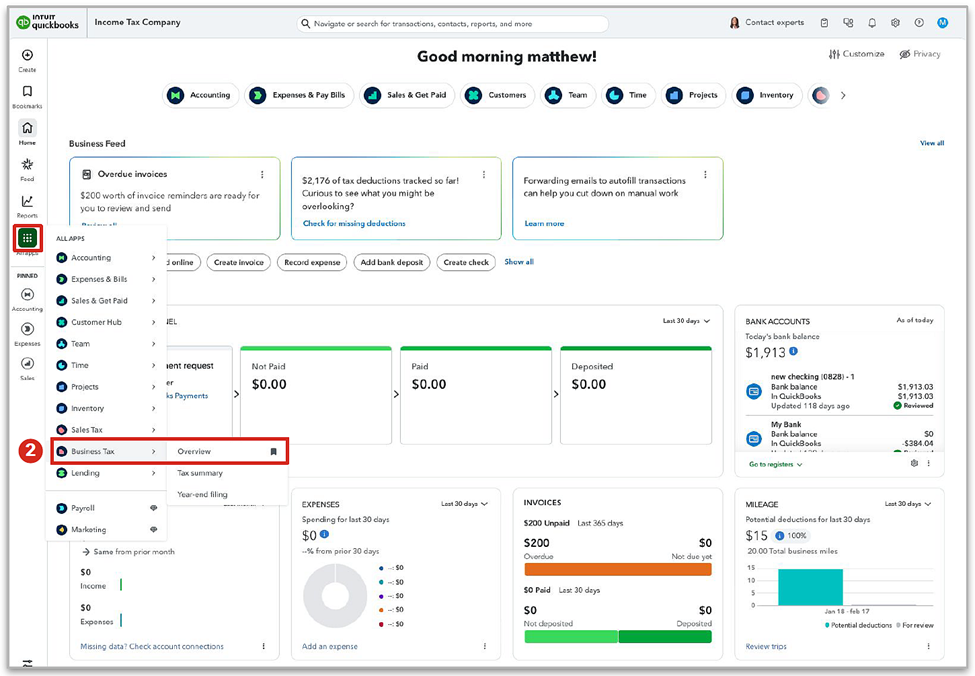
You can access Business Tax-AI within QuickBooks Online from the QBO Homepage > All Apps > Business Tax > Overview
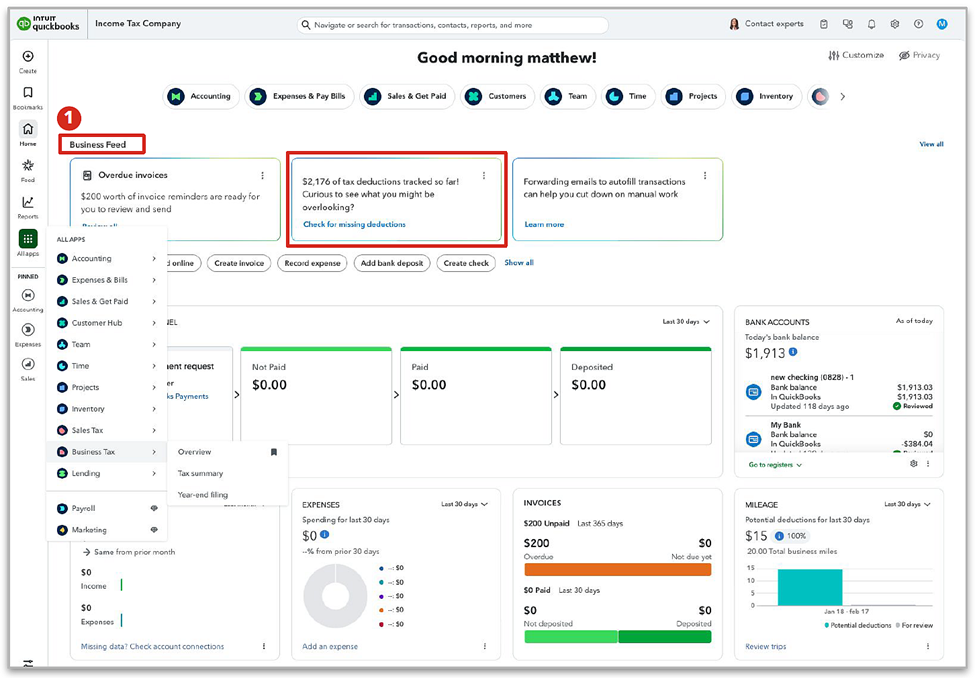
You can also access the new Business Tax-AI tool from the QBO Homepage >Business Feed > Business Tax AI tile > Check for missing deductions.
Using Business Tax-AI
Looking at the Business Tax – AI Overview, select the ‘Missing Deductions’ option under ‘Get Your (Year) Taxes Ready’ at the bottom center of your Overview. 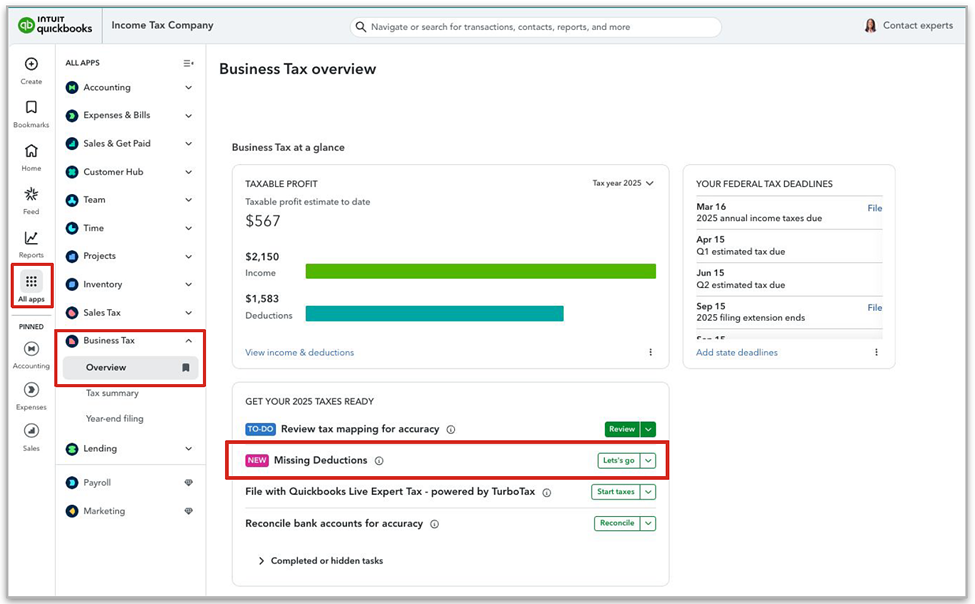 If might take you hours, even days to track down all the potential deductions you were not previously aware of, and that your client didn’t keep track of. But with the Business Tax Agent at work, it won’t be long before it helps you discover all sorts of legitimate deductions you never knew about.
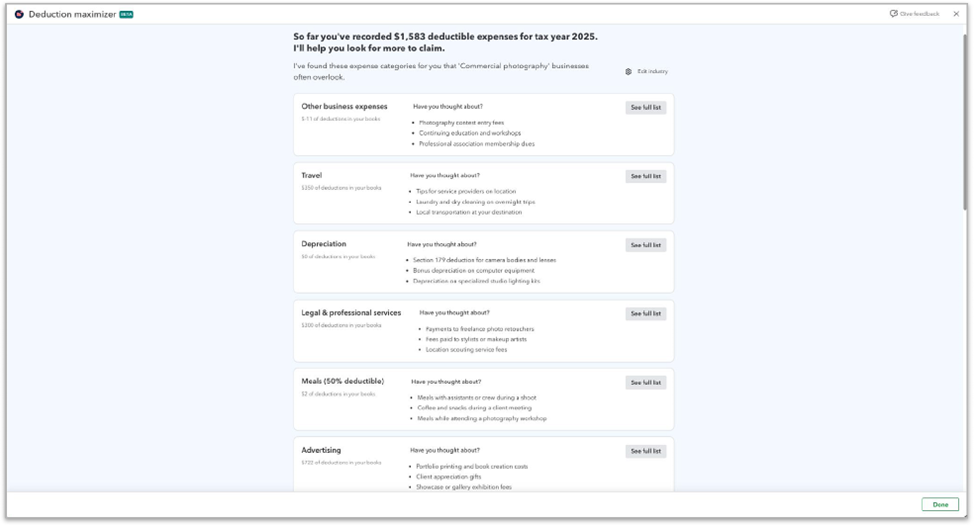
To Add an Expense within Business Tax AI
-
Access Business Tax AI
-
Select the Category where an expense is missing
-
Choose Add expense to open the expense form and add the details.
To Set a Reminder regarding an expense
-
Access Business Tax AI
-
Select the Category where an expense is missing
-
Choose Add reminder which automatically created a 30-day due task reminder.
Want to get a better feel of how the Business Tax AI Agent works for you, just check out the official Intuit video below.
Disclosures:
Feature content (including graphics and video) adapted from a Press Announcement issued by teamhighwire.com on behalf of Intuit as well as other (*) Intuit media relations content within the Intuit Firm of the Future blog. Features adapted by Insightful Accountant from Intuit source content are furnished for educational purposes only.
Intuit® Inc., is a publicly traded corporation headquartered in Mountain View, California. Intuit is the global financial technology platform that powers prosperity for the people and communities we serve. With approximately 100 million customers worldwide using products such as TurboTax, Credit Karma, QuickBooks, and Mailchimp, Intuit believes that everyone should have the opportunity to prosper. Intuit never stops working to find new, innovative ways to make that possible.
Other trade names or references, if any, within this feature may refer to registered, trademarked, or copyrighted materials held by their respective owners and are included only for informational and educational purposes.
This is an editorial feature, not sponsored content. No vendor associated with this article has paid Insightful Accountant or the author any remuneration to be included in this feature. The article is provided solely for informational and educational purposes.
Note: Registered Trademark ® and other registration symbols (such as those used for copyrighted materials) have been eliminated from the articles within this publication for brevity due to the frequency or abundance with which they would otherwise appear or be repeated. We attempt to credit such trademarks or copyrights within our respective article footnotes and disclosures.