
Now, you can set up playbooks within Intuit Accountant Suite for various types or verticals of clients to standardize company settings, chart of accounts, accounting policies, books close settings, custom fields, and user access groups.
These ‘playbooks’ are designed to help accountants and bookkeepers streamline their workflow within Intuit Accountant Suite. They provide step-by-step guidance and best practices for managing client accounts, automating tasks, and improving efficiency. In addition to the areas mentioned above, playbooks can cover areas like client onboarding and setup, workflow automation and reminders, transaction categorization and reconciliation, payroll processing and compliance, reporting, and tax preparation.
Once your firm creates these playbooks, you can instantly apply them to either new or existing clients within Intuit Accountant Suite. Recognizing that times, policies, and procedures change, you can make changes to the playbooks you’ve created and push those changes into any or all of your clients.
The use of playbooks can standardize how every member of your team performs tasks like onboarding of new clients in order to maintain consistency across your entire client base. That reduces compliance risk and eliminates the ‘odd client out’ who a team member insists must be dealt with differently.
It also means that you can quickly standard who work with what type of clients, and what those individuals are permitted to do for those clients, along with who has sign-off authority of both team member tasks and client work product.
1) To use playbooks, head over to the Firm Hub within Intuit Accountant Suite.
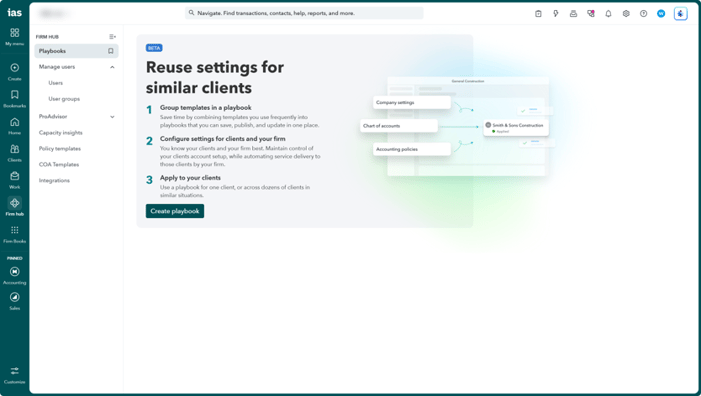
2) Select Playbooks, if you never created a playbook, read the opening page (shown above) and click Create playbook.
3) The New playbook window opens, give the playbook a name, and optional description, like the one shown below; then choose Create.

4) QuickBooks begins the process of building your playbook, it then opens the Playbook Overview window (as show below) which you will need to edit.
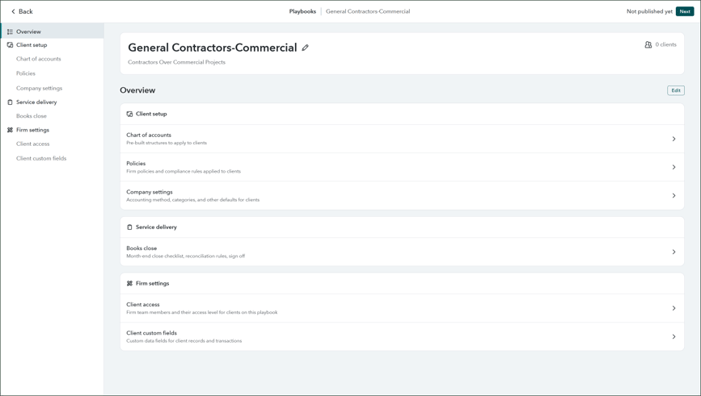
5) Proceed to work in each area: Client Setup, Service Delivery and Firm Settings:
-
-
Chart of Accounts, apply an existing COA template or create a new one for this playbook.
-
Policies, apply the firm policies and compliance rules for this playbook.
-
Select the company settings including accounting method, categories and other standard practices you want followed for this type of client.
-
You can select the month-end close checklist and reconciliation rules for closing the books under this playbook.
-
Choose which team members can access this client type and select their respective access level.
-
Define any custom data fields you want to standardize for this type of client at both the client and transactional level.
-
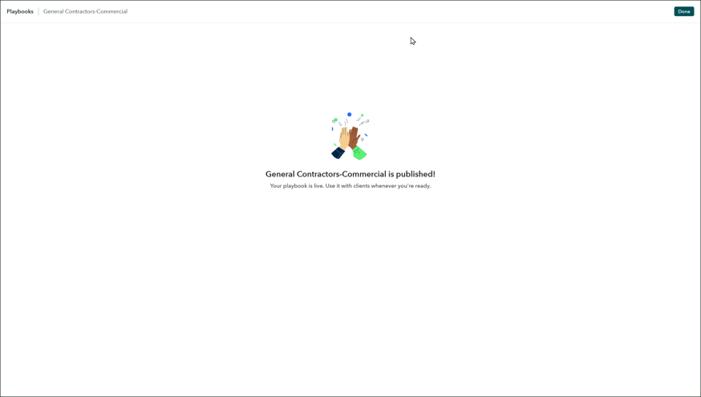
6) Publish your playbook to the appropriate clients. If you don't currently have the type of clients for which the playbook is configured, you can publish it without clients, and it will be ready when you expand into serving those client types.
Using playbooks can help you reduce manual data entry, minimize errors, and ensure timely completion of bookkeeping tasks, as well as maintaining consistency across your firm.
Disclaimers:
Some content (including feature graphics) have been adapted from Intuit media source materials and from Intuit Accountant Suite 'in-product help' documentation. Insightful Accountant publishes such adapted content for educational and informational purposes only.
Intuit Accountant Suite is a registered trademark of Intuit, a corporation based in Mountain View, CA.
Any other trade names or entities mentioned within this article that refer to products registered, trademarked, or otherwise held by their respective owners are hereby acknowledged as such. Such references are solely for informational and educational purposes.
This feature is "not" sponsored content. The article is provided for informational and educational purposes. The publication of this article does not represent an endorsement by either the editors or publishers of Insightful Accountant.
Note: Registered Trademark ® symbols have been eliminated from the articles within this publication for brevity due to their frequent occurrence. We attempt to credit such trademarked products within our respective article footnotes and disclosures