
App Aware features are concise articles intended to inform you about a specific app. This feature provides a synopsis of Coupler.io.
App Introduction
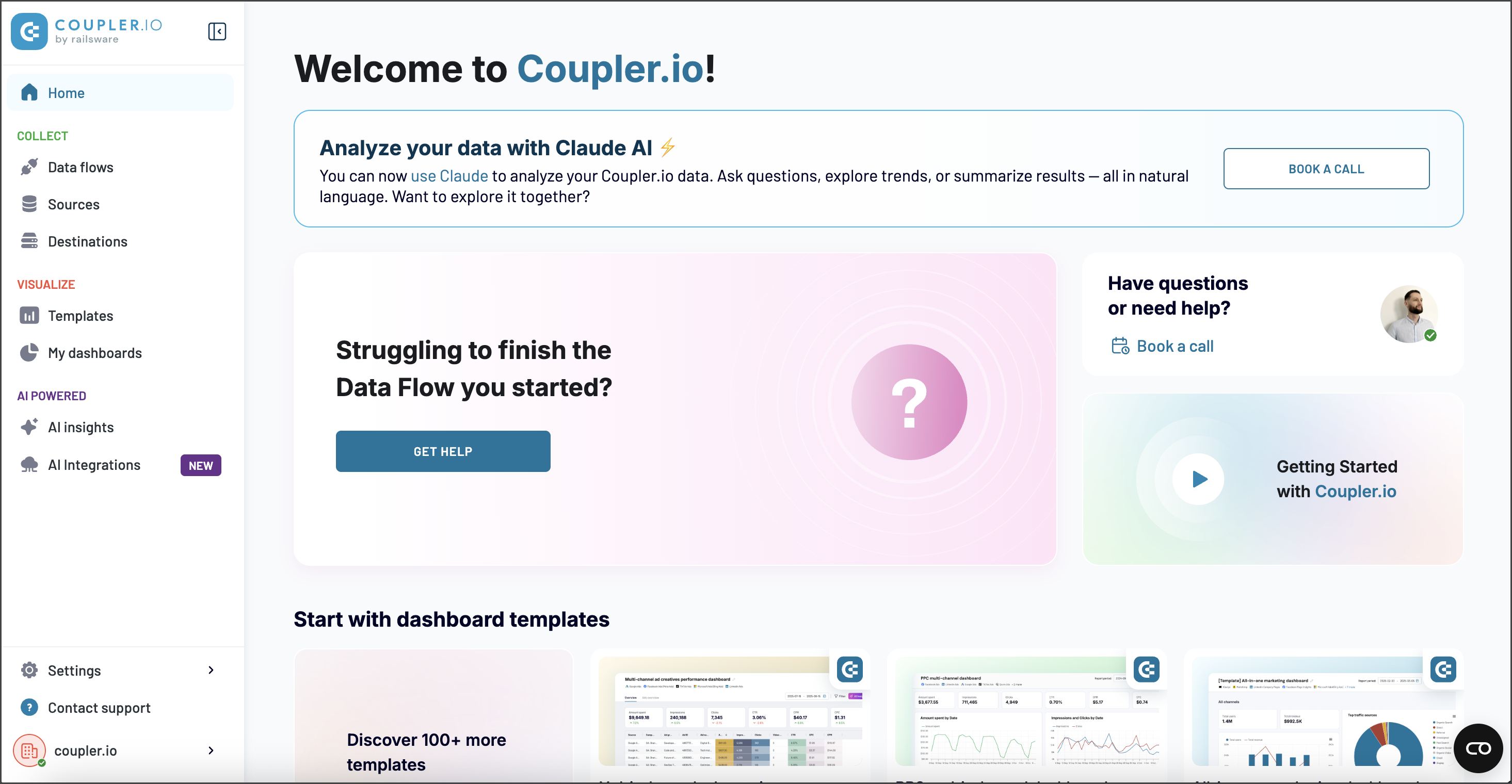
Coupler.io is a data integration and AI-analytics platform. With minimal setup, it allows users to collect, organize, transform, visualize, and understand their business data for analysis and decision-making. By using Coupler.io data connectors for QuickBooks, Xero, Stripe, and dozens of other platforms, you can automatically export data to spreadsheets, data warehouses, BI tools, or AI agents.
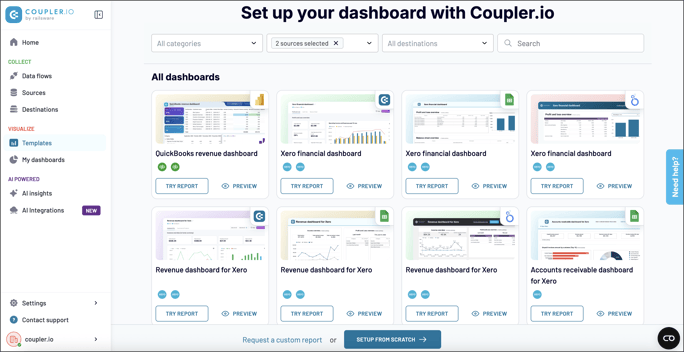
Coupler.io offers a free dashboard and reporting templates gallery for extensive finance and business use cases. Over 130 templates for built-in visualization including Power BI, Looker Studio, Google Sheets, and more.
Coupler.io helps accountants, finance experts, and business owners remove manual exports and inaccuracies in financial analytics. The platform serves as a single solution for finance data management and reporting, empowering teams with clean data for monitoring, forecasting, and decision-making.
The transformation module is a powerful feature that allows users to clean and modify data before analysis by applying formulas and filters, joining and appending data, and using data set templates. With AI integrations by Coupler.io, you can enable analytics via natural language conversations in Claude or other agents, which empower real-time insights and eliminate dependencies on tech teams.
Coupler.io is a reliable platform that's compliant with GDPR, SOC 2, and other significant data security standards.
Key Benefits
-
Unified platform to aggregate, manage, and analyze financial data end-to-end. Includes free dashboard and report templates gallery for in-app, Power BI, Looker Studio, and G Sheets.
-
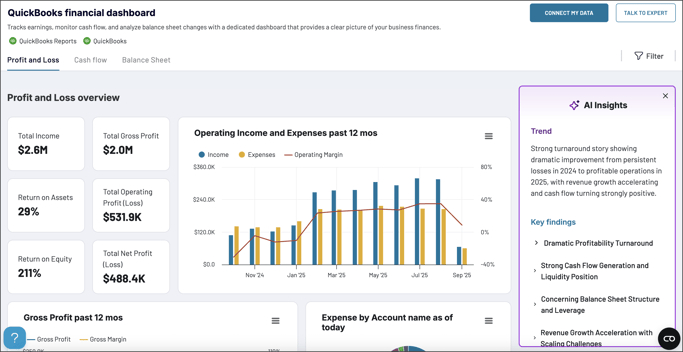
The AI Insights feature to instantly interpret dashboard data and provide actionable recommendations.
-
Provides automatic data refresh, you set the schedule: daily, hourly, every 15 minutes, or custom.
-
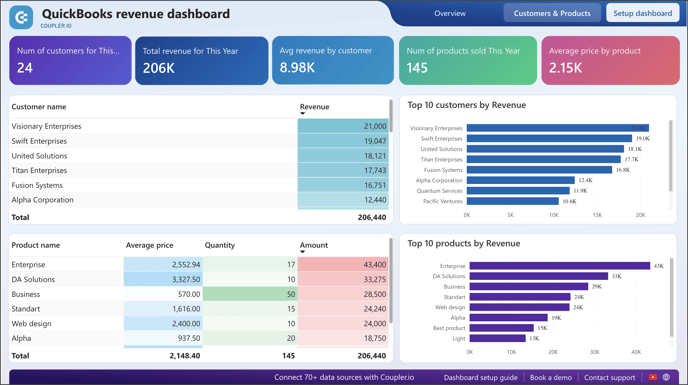
Offers great QuickBooks to Power BI integration. Users can easily import their finance data to 14 data destinations: spreadsheets, BI tools,and data warehouses.
-
Offers AI integrations for conversational, real-time data analysis in Claude, ChatGPT, etc. Plus integrations with 300+ business apps, over 50 of which are directly beneficial to accountants and finance professionals.
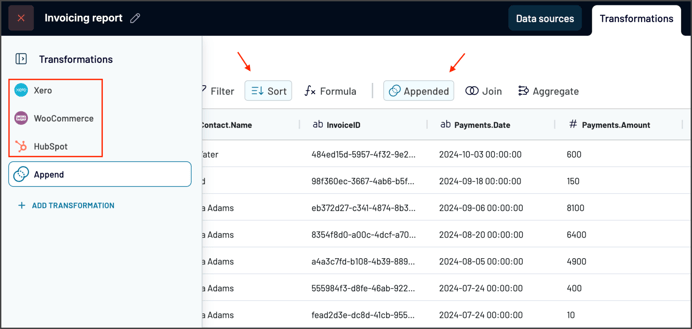
- Data transformations: blending, appending or consolidating data from multiple sources, applying formulas and filters, using pre-defined data sets, etc.
-
Compliant with GDPR, SOC 2 Type II, and other standards to ensure data security and privacy.
App Comparison and Contrast
When asked to identify similar apps with which to compare or contrast Coupler.io, you would likely consider the native data connectors within or offered by QuickBooks for contrasting purposes, or the applications available from G-Accon or CData for comparison purposes.
Working with QuickBooks and Xero
- Coupler.io integrates with U.S. versions of QuickBooks Online (Self-Employed, Simple Start, Essentials, Plus, Advanced, Accountant and Ledger). Coupler.io also integrates with the Canadian, Europe, Middle East/Africa, Asia Pacific, Americas, and Rest-of-world (Global) versions of QuickBooks Online.
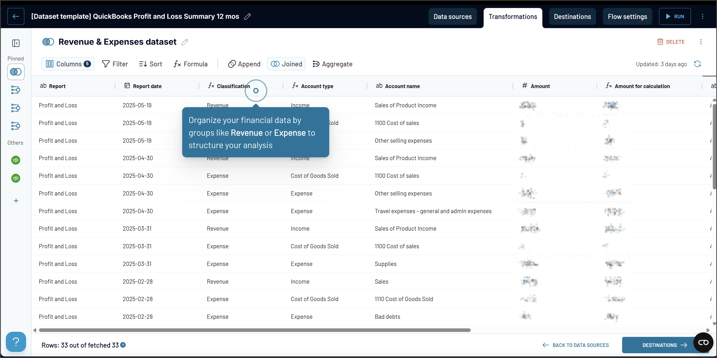
- Coupler.io's QuickBooks connector grabs raw financial data and reports from your QuickBooks account via the API. Ith then transforms and unifies the data, and sends it to your chosen destination, automatically refreshing data and providing a bridge between platforms. This is all done with a minimum of mouse clicks, there is no need for coding, copy and pasting of credentials, or configuring other tech aspects. The user simply authorize their QuickBooks account(s) in Coupler.io with button clicks. Once authorized, the user can this account in any Coupler.io data flows, choosing the account from the list of available sources.
- You will find Coupler.io in the Intuit App Store at: https://quickbooks.intuit.com/app/apps/appdetails/coupler_io/en-global/
- Coupler.io also integrates with Xero (Early, Growing, and Established, and Xero Cashbook).
- Connections with Xero are similar. For example, if starting with a dashboard template, the user just chooses and authorizes the connection to their Xero account and entity (company data) file. An automatic transformation of the Xero data sets the data to showcase to the specific dashboard template chosen by the user. Coupler.io makes it simple to access your Xero data and display it in one of the pre-configured dashboards without any technical hassle or tech team dependencies.
- You will find Coupler.io in the Xero App Store at: https://apps.xero.com/app/couplerio
Ease of Use
If a Coupler.io user chooses a QuickBooks data (company) file as their data source, then then select data dimensions and a destination (for example, Google Sheets or Power BI). Before loading data into the destination, there's a transformation step, so the user can option to use prepare data templates or option to prepare the data on their own (e.g., sort columns, filter, aggregate metrics, etc.). As a final step, the user sets their preferred data refresh schedule.
An alternative way to start is to begin with a reporting templates. The user chooses their desired template, connects to a QuickBooks (or Xero) data (company/entity) file and their chosen data destination account (like Power BI, for example). With a few clicks of the mouse, the user has their real-time dashboard.
Find Out More
You can find out more about Coupler.io at their webpage. You can access a access a 'free trial' of Coupler.io from their pricing page here. You can get more details on how easy Coupler.io makes it to turn your QuickBooks (or other data source) data into dashboards and custom reports at this official Coupler.io tutorial.
Disclosures:
App Aware features are concise articles designed to summarize an App and make readers aware of it. These features are primarily composed of information provided by the App Developer, with only a cursory review of the Developer's website or QuickBooks/Xero App store webpages by Insightful Accountant writers, editors, or staff.
*- App Aware features do not involve any independent testing or analysis by the author, and they do not represent any endorsement by either Insightful Accountant or the author.
Coupler.io is a registered tradename of Railsware and Railsware Products Studio, LLC with offices at 117 East Colorado Blvd, Suite 600, Pasadena, California, USA 91105. Railsware is headquartered in Krakow, Poland with offices in Kyiv, Ukraine, and Dubai, UAE.
Any other trade names or references (including QuickBooks and Xero) used herein refer to registered, trademarked, or copyrighted materials held by their respective owners; they are included in the content for informational and educational purposes only.
This is an editorial feature, not sponsored content. No vendor associated with this article has paid Insightful Accountant or the author any form of remuneration to be included within this feature. The article is provided solely for informational and educational purposes.
Note: Registered Trademark ® and other registration symbols (such as those used for copyrighted materials) have been eliminated from the articles within this publication for brevity due to the frequency or abundance with which they would otherwise appear or be repeated. Every attempt is made to credit such trademarks or copyrights within our respective article footnotes and disclosures.
Topics from this blog: App Aware