
App Aware is one of Insightful Accountant's most popular features for both our readers and contributing developers because the articles summarize an App or Software for integration with one or more accounting platforms. Today, Murph seeks to make you 'App Aware' of PeaBrain.
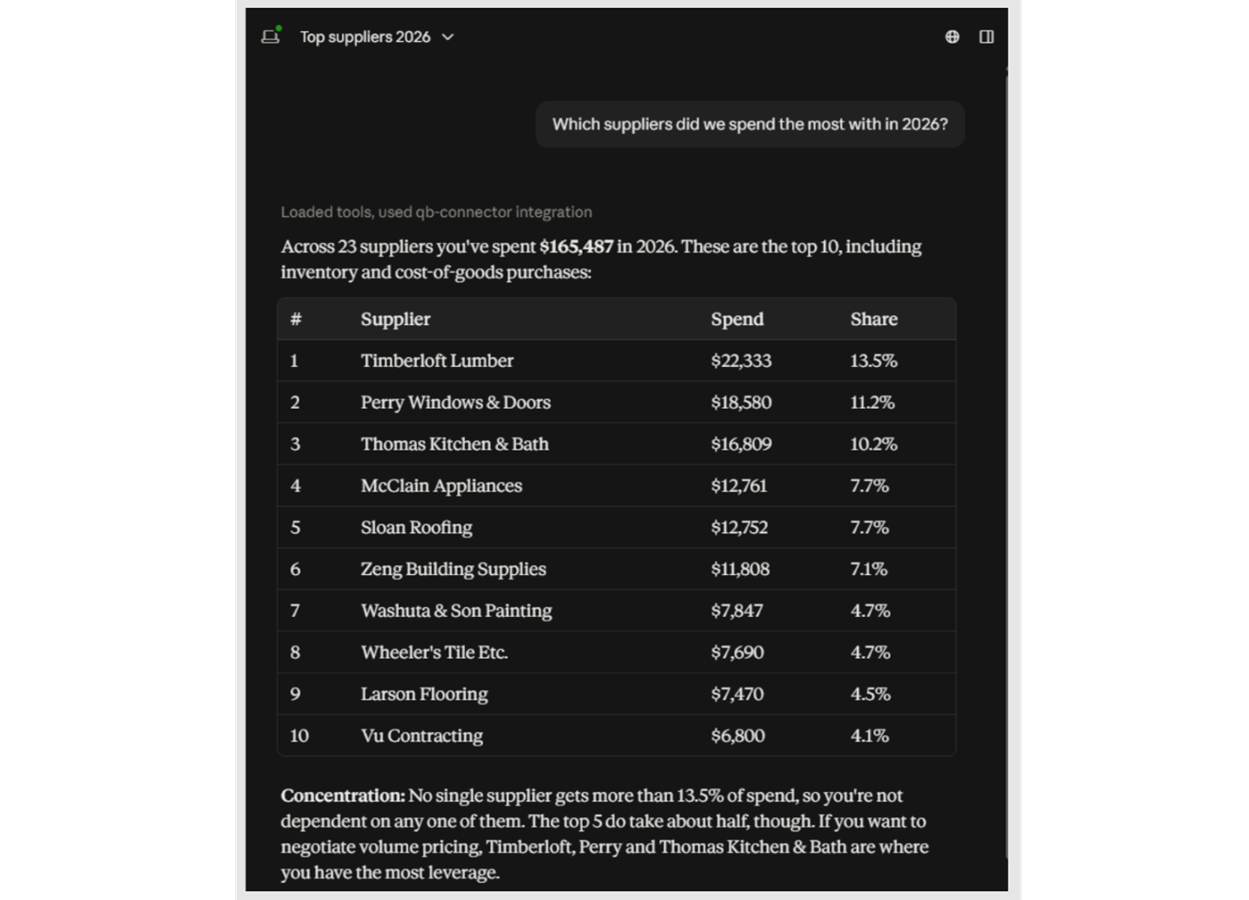
AskPeaBrain gives QuickBooks Desktop users a conversational way to work with the accounting data they already have. Instead of exporting data, building one-off reports, or digging through menus every time a new question comes up, a business owner or advisor can ask plain-English questions such as “Which customers are more than 60 days past due?” or “What did we spend with this vendor last year?” and receive answers based on their own QuickBooks Desktop data.
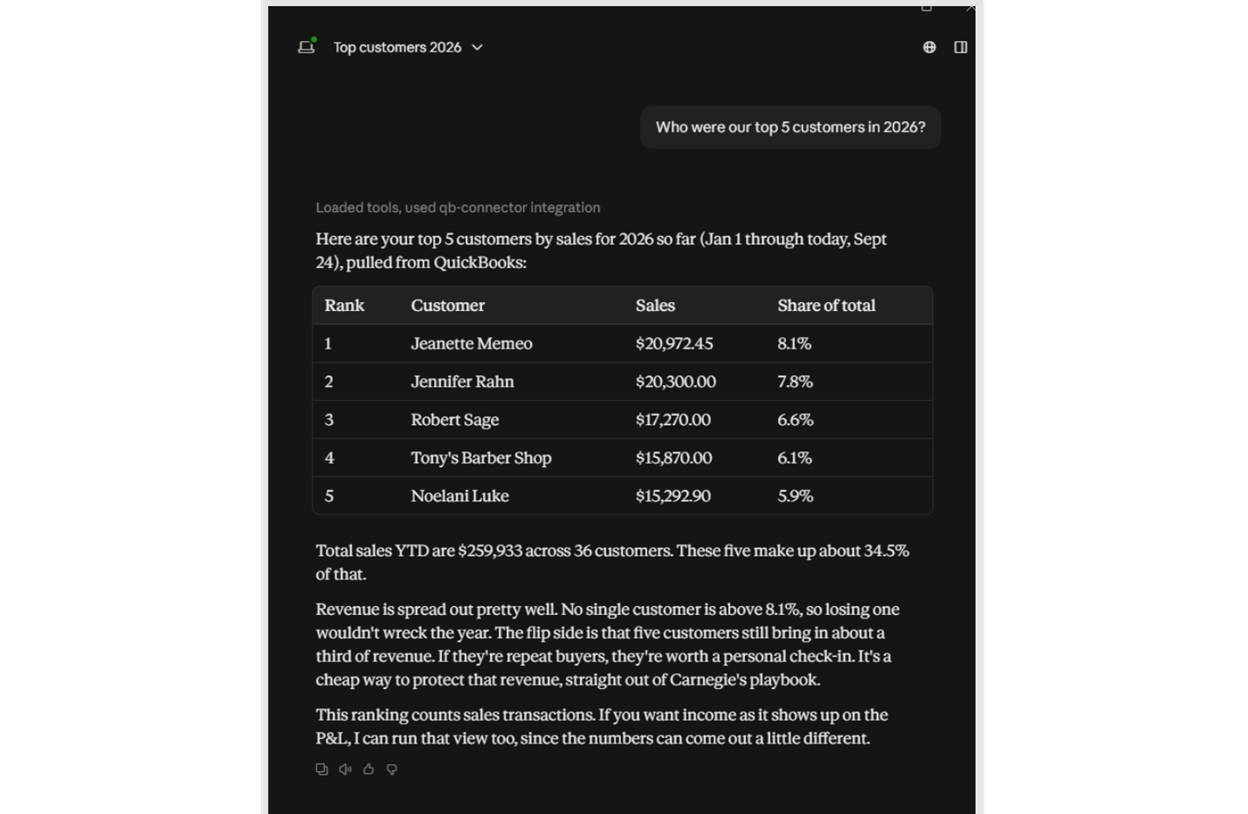
AskPeaBrain is designed for businesses that want more modern, AI-assisted access to their information without being forced to leave QuickBooks Desktop. And each PeaBrain implementation is configured around the customer’s business, including terminology, reporting preferences, account structure, and important company-specific rules to make it as user friendly as possible.
Key Benefits of the App
-
Ask plain-English questions directly against existing QuickBooks Desktop data.
-
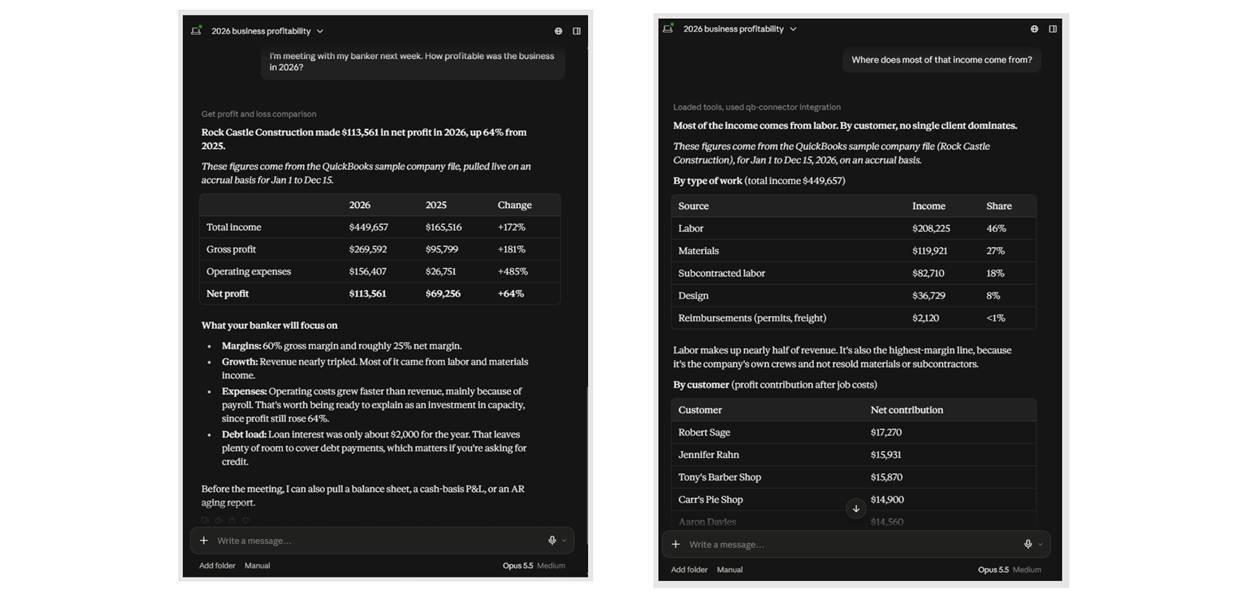
Get answers to ad hoc business questions without building a new report or export each time.
-
Keep using QuickBooks Desktop rather than migrating to QuickBooks Online just to access newer AI-style workflows.
-
Configure the experience around each company’s terminology, account structure, reporting needs, and business rules.
-
Use familiar conversational prompts for questions about customers, vendors, sales, receivables, expenses, items, and other QuickBooks data.
-
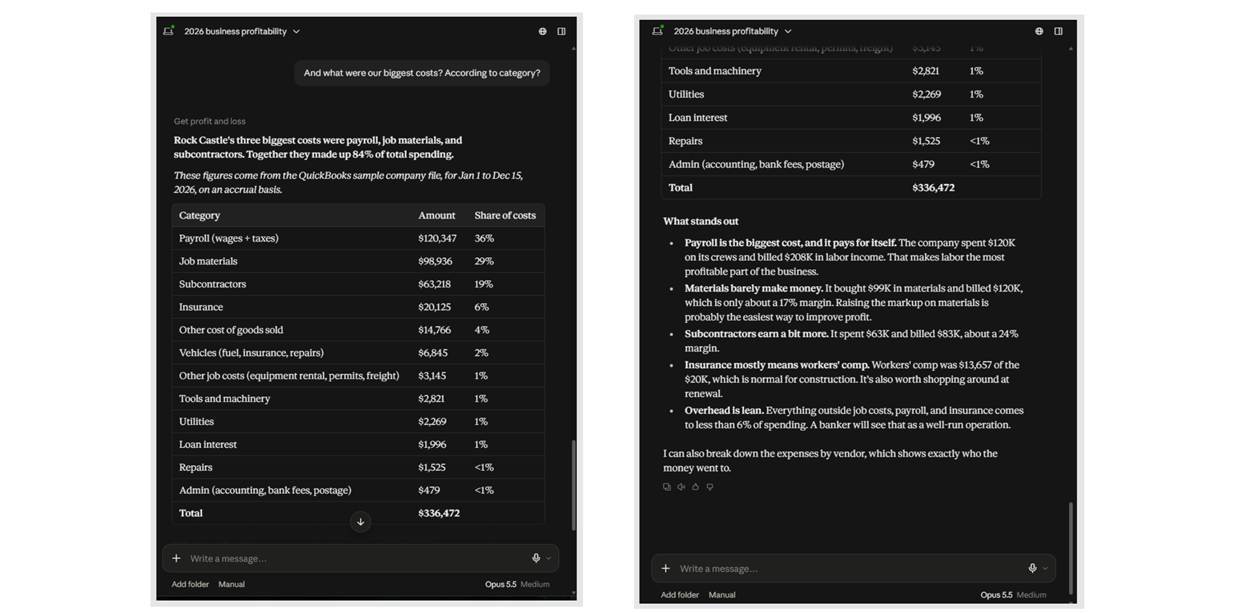
Provide business owners and advisors with faster access to information that may otherwise require manual reporting or spreadsheet work.
-
Maintain a separate, customer-specific implementation rather than combining multiple businesses into a shared accounting environment.
-
Designed primarily for analysis and information retrieval, without requiring users to change the way they already operate QuickBooks Desktop.
How the App Works
AskPeaBrain is set up individually for each business. During onboarding, the customer’s QuickBooks Desktop environment is connected and the system is configured around how that company operates, including its terminology, important accounts, reporting preferences, and company-specific rules.
The end user then interacts with AskPeaBrain conversationally through Claude. They can ask normal business questions instead of learning a query language or building a custom report. AskPeaBrain determines which QuickBooks information is needed, retrieves the relevant data, and uses it to answer the question.
The goal is to make the information already stored inside QuickBooks Desktop substantially easier to access without asking the business to replace its existing accounting system.
Accounting Application Integration
QuickBooks
AskPeaBrain only integrates with QuickBooks Desktop including U.S. versions of QuickBooks Desktop Pro, QuickBooks Desktop Premier and QuickBooks Desktop Enterprise.
AskPeaBrain connects to the customer’s existing QuickBooks Desktop company data through a connector installed and authorized as part of the onboarding process. The customer continues using QuickBooks Desktop normally.
Once connected, AskPeaBrain can retrieve authorized accounting information needed to answer the user’s questions. For example, it can use customer, invoice, payment, vendor, transaction, item, account, and other available QuickBooks information to answer questions about the business.
The connection is configured separately for each customer, and the AskPeaBrain experience can then be tailored to the way that particular company uses QuickBooks. The customer does not need to migrate to QuickBooks Online, routinely export files, or maintain a separate reporting database just to ask questions about their accounting data.
Competitive Landscape
Within the Fintech market, QQube and QODBC may be considered as somewhat similar Apps or Software capable of extracting data from QuickBooks Desktop like PeaBrain. Insightful Accountant made no attempt to compare any of these apps, nor does it endorse any of these three apps for the purposes specified herein.
Conclusion
If you are looking for a conversational inquiry solution to that works with U.S. versions of QuickBooks Desktop, check out PeaBrain.
For More Information
Additional details are available at the company’s website. You can also contact Caleb Montgomery with PeaBrain, LLC, 2483 Davis Rock Drive # 4312, Dacula, Georgia, 30019.
Disclosures:
Content herein is based on information submitted by the subject of this feature. Any additional content was adapted from information obtained from the developer's website and its associated content.
Any other trade names or references used herein may refer to registered, trademarked, or copyrighted materials held by their respective owners; they are included in the content for informational and educational purposes only.
Note: Registered Trademark ® and other registration symbols (such as those used for copyrighted materials) have been eliminated from the articles within this publication for brevity due to the frequency or abundance with which they would otherwise appear or be repeated. Every attempt is made to credit such trademarks or copyrights within our respective article footnotes and disclosures.